Yomichan
Note: this project is no longer maintained. Please see this
post for more information.
Yomichan turns your web browser into a tool for building Japanese language literacy by helping you to decipher texts
which would be otherwise too difficult tackle. This extension is similar to
Rikaichamp for Firefox and
Rikaikun for Chrome, but it
stands apart in its goal of being an all-encompassing learning tool as opposed to a mere browser-based dictionary.
Yomichan provides advanced features not available in other browser-based dictionaries:
- Interactive popup definition window for displaying search results.
- On-demand audio playback for select dictionary definitions.
- Kanji stroke order diagrams are just a click away for most characters.
- Custom search page for easily executing custom search queries.
- Support for multiple dictionary formats including EPWING via the Yomichan Import tool.
- Automatic note creation for the Anki flashcard program via the AnkiConnect plugin.
- Clean, modern code makes it easy for developers to contribute new features.


Table of Contents
Installation
Yomichan comes in two flavors: stable and testing. Over the years, this extension has evolved to contain many
complex features which have become increasingly difficult to test across different browsers, versions, and environments.
New changes are initially introduced into the testing version, and after some time spent ensuring that they are
relatively bug free, they will be promoted to the stable version. If you are technically savvy and don’t mind
submitting issues on GitHub, try the testing version; otherwise, the stable version will be your best bet.
Note: Yomichan is no longer available for download.
Dictionaries
There are several free Japanese dictionaries available for Yomichan, with two of them having glossaries available in
different languages. You must download and import the dictionaries you wish to use in order to enable Yomichan
definition lookups. If you have proprietary EPWING dictionaries that you would like to use, check the Yomichan
Import page to learn how to convert and import them into Yomichan.
Be aware that the non-English dictionaries contain fewer entries than their English counterparts. Even if your primary
language is not English, you may consider also importing the English version for better coverage.
Basic Usage
Click the  Yomichan button in the browser bar to open the quick-actions popup.
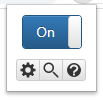
- The
 cog button will open the Settings page.
 - The
 magnifying glass button will open the Search page.
 - The
 question mark button will open the Information page.
 - The
 profile button will appear when multiple profiles exist, allowing the current profile to be quickly changed.
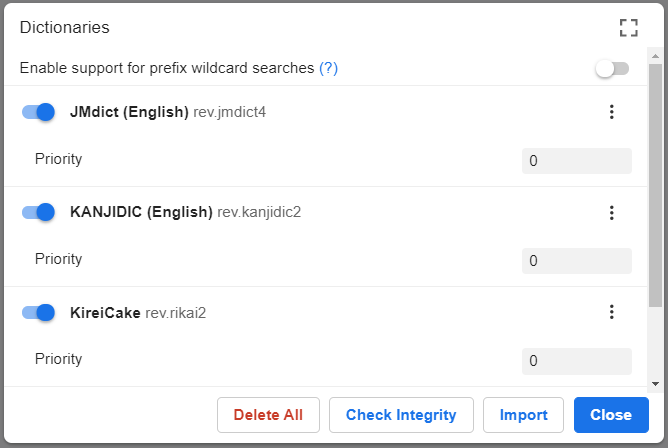
Import the dictionaries you wish to use for term and kanji searches. If you do not have any dictionaries installed
or enabled, Yomichan will warn you that it is not ready for use by displaying an orange exclamation mark over its
icon. This exclamation mark will disappear once you have installed and enabled at least one dictionary.
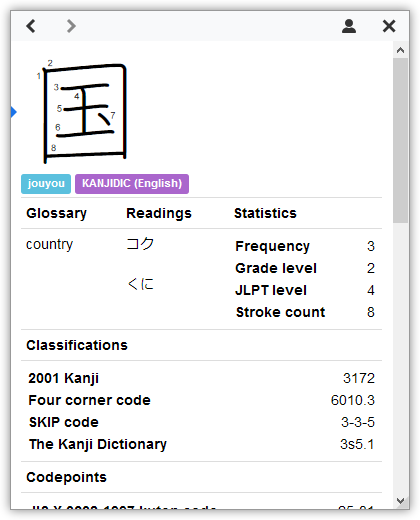
Webpage text can be scanned by moving the cursor while holding a modifier key, which is Shift
by default. If definitions are found for the text at the cursor position, a popup window containing term definitions
will open. This window can be dismissed by clicking anywhere outside of it.

Click on the  speaker button to hear the term pronounced by a native speaker. If an audio sample is
not available, you will hear a short click instead. You can configure the sources used to retrieve audio samples in
the options page.
speaker button to hear the term pronounced by a native speaker. If an audio sample is
not available, you will hear a short click instead. You can configure the sources used to retrieve audio samples in
the options page.
Click on individual kanji in the term definition results to view additional information about those characters,
including stroke order diagrams, readings, meanings, as well as other useful data.
Custom Dictionaries
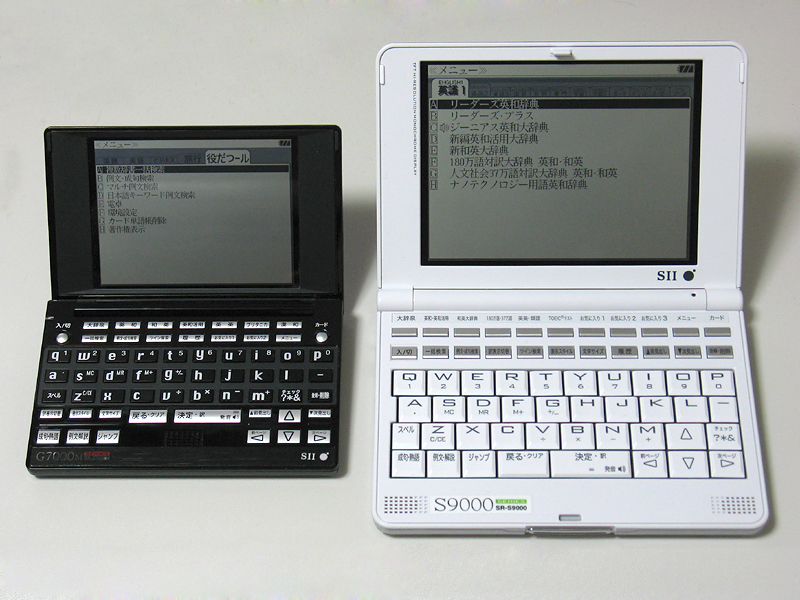
Yomichan supports the use of custom dictionaries, including the esoteric but popular
EPWING format. They were often utilized in portable electronic dictionaries
similar to the ones pictured below. These dictionaries are often sought after by language learners for their correctness
and excellent coverage of the Japanese language.
Unfortunately, as most of the dictionaries released in this format are proprietary, they are unable to be bundled with
Yomichan. Instead, you will need to procure these dictionaries yourself and import them using Yomichan
Import. Check the project page for additional details.
Anki Integration
Yomichan features automatic flashcard creation for Anki, a free application designed to help you
retain knowledge. This feature requires the prior installation of an Anki plugin called AnkiConnect.
Check the respective project page for more information about how to set up this software.
Flashcard Configuration
Before flashcards can be automatically created, you must configure the templates used to create term and/or kanji notes.
If you are unfamiliar with Anki deck and model management, this would be a good time to reference the Anki
Manual. In short, you must specify what information should be included in the
flashcards that Yomichan creates through AnkiConnect.
Flashcard fields can be configured with the following steps:
Open the Yomichan options page and scroll down to the section labeled Anki Options.
Tick the checkbox labeled Enable Anki integration (Anki must be running with AnkiConnect installed).
Select the type of template to configure by clicking on either the Terms or Kanji tabs.
Select the Anki deck and model to use for new creating new flashcards of this type.
Fill the model fields with markers corresponding to the information you wish to include (several can be used at
once). Advanced users can also configure the actual Handlebars templates used to create
the flashcard contents (this is strictly optional).
Markers for Term Cards
| Marker | Description |
|---|
{audio} | Audio sample of a native speaker’s pronunciation in MP3 format (if available). |
{clipboard-image} | An image which is stored in the system clipboard, if present. |
{clipboard-text} | Text which is stored in the system clipboard, if present. |
{cloze-body} | Raw, inflected term as it appeared before being reduced to dictionary form by Yomichan. |
{cloze-prefix} | Fragment of the containing {sentence} starting at the beginning of {sentence} until the beginning of {cloze-body}. |
{cloze-suffix} | Fragment of the containing {sentence} starting at the end of {cloze-body} until the end of {sentence}. |
{conjugation} | Conjugation path from the raw inflected term to the source term. |
{dictionary} | Name of the dictionary from which the card is being created (unavailable in grouped mode). |
{document-title} | Title of the web page that the term appeared in. |
{expression} | Term expressed as kanji (will be displayed in kana if kanji is not available). |
{frequencies} | Frequency information for the term. |
{furigana} | Term expressed as kanji with furigana displayed above it (e.g. 日本語). |
{furigana-plain} | Term expressed as kanji with furigana displayed next to it in brackets (e.g. 日本語[にほんご]). |
{glossary} | List of definitions for the term (output format depends on whether running in grouped mode). |
{glossary-brief} | List of definitions for the term in a more compact format. |
{glossary-no-dictionary} | List of definitions for the term, except the dictionary tag is omitted. |
{part-of-speech} | Part of speech information for the term. |
{pitch-accents} | List of pitch accent downstep notations for the term. |
{pitch-accent-graphs} | List of pitch accent graphs for the term. |
{pitch-accent-positions} | List of accent downstep positions for the term as a number. |
{reading} | Kana reading for the term (empty for terms where the expression is the reading). |
{screenshot} | Screenshot of the web page taken at the time the term was added. |
{search-query} | The full search query shown on the search page. |
{selection-text} | The selected text on the search page or popup. |
{sentence} | Sentence, quote, or phrase that the term appears in from the source content. |
{sentence-furigana} | Sentence, quote, or phrase that the term appears in from the source content, with furigana added. |
{tags} | Grammar and usage tags providing information about the term (unavailable in grouped mode). |
{url} | Address of the web page in which the term appeared in. |
Markers for Kanji Cards
| Marker | Description |
|---|
{character} | Unicode glyph representing the current kanji. |
{clipboard-image} | An image which is stored in the system clipboard, if present. |
{clipboard-text} | Text which is stored in the system clipboard, if present. |
{cloze-body} | Raw, inflected parent term as it appeared before being reduced to dictionary form by Yomichan. |
{cloze-prefix} | Fragment of the containing {sentence} starting at the beginning of {sentence} until the beginning of {cloze-body}. |
{cloze-suffix} | Fragment of the containing {sentence} starting at the end of {cloze-body} until the end of {sentence}. |
{dictionary} | Name of the dictionary from which the card is being created. |
{document-title} | Title of the web page that the kanji appeared in. |
{frequencies} | Frequency information for the kanji. |
{glossary} | List of definitions for the kanji. |
{kunyomi} | Kunyomi (Japanese reading) for the kanji expressed as katakana. |
{onyomi} | Onyomi (Chinese reading) for the kanji expressed as hiragana. |
{screenshot} | Screenshot of the web page taken at the time the kanji was added. |
{search-query} | The full search query shown on the search page. |
{selection-text} | The selected text on the search page or popup. |
{sentence} | Sentence, quote, or phrase that the character appears in from the source content. |
{sentence-furigana} | Sentence, quote, or phrase that the character appears in from the source content, with furigana added. |
{stroke-count} | Number of strokes that the kanji character has. |
{url} | Address of the web page in which the kanji appeared in. |
When creating your model for Yomichan, make sure that you pick a unique field to be first; fields that will
contain {expression} or {character} are ideal candidates for this. Anki does not allow duplicate flashcards to be
added to a deck by default; it uses the first field in the model to check for duplicates. For example, if you have {reading}
configured to be the first field in your model and 橋 is already in your deck, you will not
be able to create a flashcard for 箸 because they share the same reading.
Flashcard Creation
Once Yomichan is configured, it becomes trivial to create new flashcards with a single click. You will see the following
icons next to term definitions:
- Clicking
 adds the current expression as kanji (e.g. 食べる).
 - Clicking
 adds the current expression as hiragana or katakana (e.g. たべる).
Below are some troubleshooting tips you can try if you are unable to create new flashcards:
- Individual icons will appear grayed out if a flashcard cannot be created for the current definition (e.g. it already exists in the deck).
- If all of the buttons appear grayed out, then you should double-check your deck and model configuration settings.
- If no icons appear at all, make sure that Anki is running in the background and that AnkiConnect has been installed.
Keyboard Shortcuts
The following shortcuts are globally available:
| Shortcut | Action |
|---|
| Alt + Insert | Open search page. |
| Alt + Delete | Toggle extension on/off. |
The following shortcuts are available on search results:
| Shortcut | Action |
|---|
| Esc | Cancel current search. |
| Alt + PgUp | Page up through results. |
| Alt + PgDn | Page down through results. |
| Alt + End | Go to last result. |
| Alt + Home | Go to first result. |
| Alt + Up | Go to previous result. |
| Alt + Down | Go to next result. |
| Alt + b | Go to back to source term. |
| Alt + e | Add current term as expression to Anki. |
| Alt + r | Add current term as reading to Anki. |
| Alt + p | Play audio for current term. |
| Alt + k | Add current kanji to Anki. |
Frequently Asked Questions
I’m having problems importing dictionaries in Firefox, what do I do?
Yomichan uses the cross-browser IndexedDB system for storing imported dictionary data into your user profile. Although
everything “just works” in Chrome, depending on settings, Firefox users can run into problems due to browser bugs.
Yomichan catches errors and tries to offer suggestions about how to work around Firefox issues, but in general at least
one of the following solutions should work for you:
- Make sure you have cookies enabled. It appears that disabling them also disables IndexedDB for some reason. You
can still have cookies be disabled on other sites; just make sure to add the Yomichan extension to the whitelist of
whatever tool you are using to restrict cookies. You can get the extension “URL” by looking at the address bar when
you have the search page open.
- Make sure that you have sufficient disk space available on the drive Firefox uses to store your user profile.
Firefox limits the amount of space that can be used by IndexedDB to a small fraction of the disk space actually
available on your computer.
- Make sure that you have history set to “Remember history” enabled in your privacy settings. When this option is
set to “Never remember history”, IndexedDB access is once again disabled for an inexplicable reason.
- As a last resort, try using the Refresh Firefox
feature to reset your user profile. It appears that the Firefox profile system can corrupt itself preventing
IndexedDB from being accessible to Yomichan.
Will you add support for online dictionaries?
Online dictionaries will not be implemented because it is not possible to support them in a robust way. In order to
perform Japanese deinflection, Yomichan must execute dozens of database queries for every single word. Factoring in
network latency and the fragility of web scraping, it would not be possible to maintain a good and consistent user
experience.
Is it possible to use Yomichan with files saved locally on my computer with Chrome?
In order to use Yomichan with local files in Chrome, you must first tick the Allow access to file URLs checkbox
for Yomichan on the extensions page. Due to the restrictions placed on browser addons in the WebExtensions model, it
will likely never be possible to use Yomichan with PDF files.
Is it possible to delete individual dictionaries without purging the database?
Yomichan is able to delete individual dictionaries, but keep in mind that this process can be very slow and can
cause the browser to become unresponsive. The time it takes to delete a single dictionary can sometimes be roughly
the same as the time it originally took to import, which can be significant for certain large dictionaries.
Why aren’t EPWING dictionaries bundled with Yomichan?
The vast majority of EPWING dictionaries are proprietary, so they are unfortunately not able to be included in
this extension due to copyright reasons.
When are you going to add support for $MYLANGUAGE?
Developing Yomichan requires a decent understanding of Japanese sentence structure and grammar, and other languages
are likely to have their own unique set of rules for syntax, grammar, inflection, and so on. Supporting additional
languages would not only require many additional changes to the codebase, it would also incur significant maintenance
overhead and knowledge demands for the developers. Therefore, suggestions and contributions for supporting
new languages will be declined, allowing Yomichan’s focus to remain Japanese-centric.
Licenses
Required licensing notices for this project follow below:
EDRDG License
This package uses the EDICT and
KANJIDIC dictionary files. These files are the property of
the Electronic Dictionary Research and Development Group, and are used in conformance with
the Group’s license.
Kanjium License
The pitch accent notation, verb particle data, phonetics, homonyms and other additions or modifications to EDICT,
KANJIDIC or KRADFILE were provided by Uros Ozvatic through his free database.
Third-Party Libraries
Yomichan uses several third-party libraries to function. Below are links to homepages, snapshots, and licenses of the exact
versions packaged.